

Nutrition tracking for lifters

Calorie & Macro Tracker Built Into Your Workout App

Eat to the plan you train to.

Log food by search, barcode, quick add, or custom entry. See calories, protein, carbs, and fat against targets you can check, right next to your workouts and PRs.

Download on the App StoreGet it on Google Play

Log food next to your workouts on iPhone and Android: calories, macros, favorites, and a recap of every day.

  • Calories, protein, carbs, and fat
  • Search, barcode, quick add
  • Works offline
  • No score. No guilt.
See what's free and what's Premium
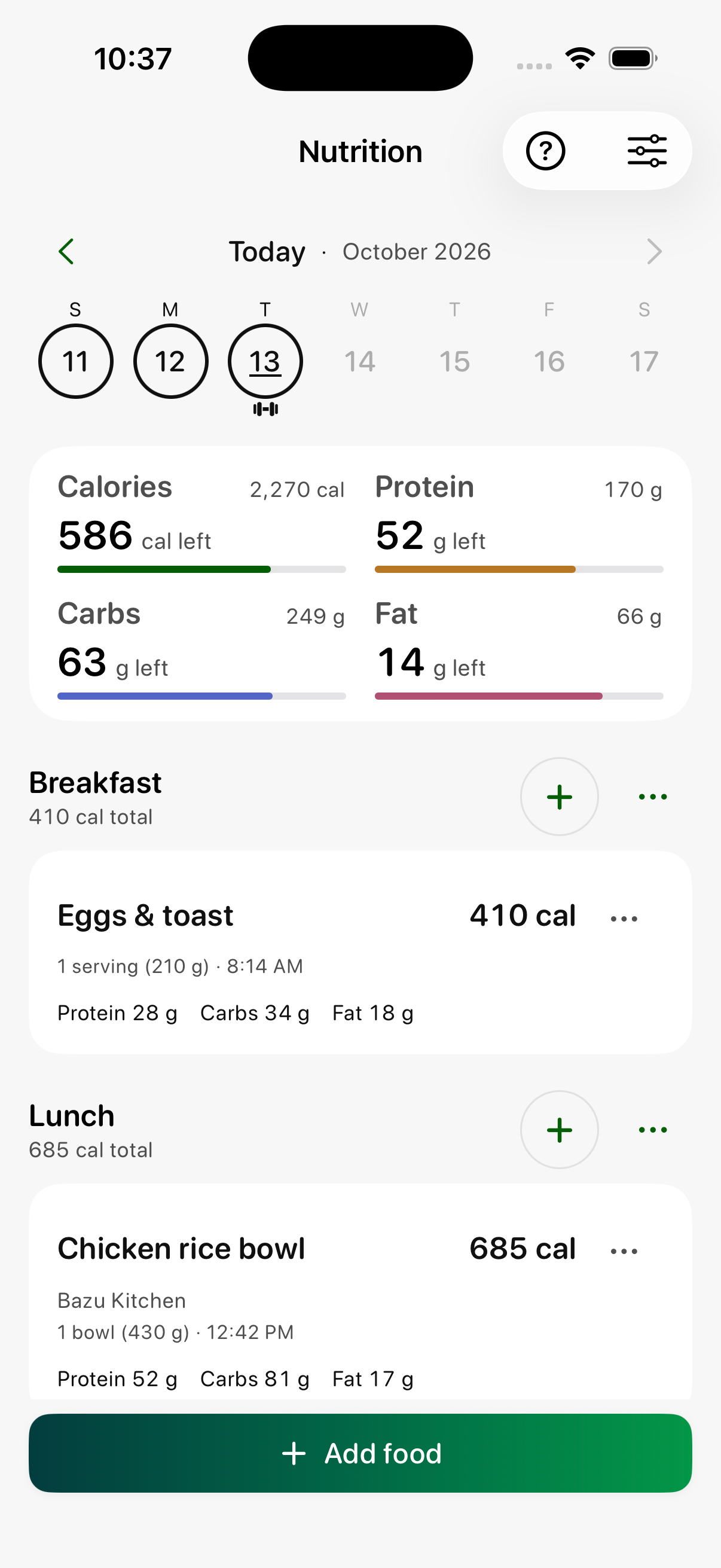
Bazu Nutrition showing daily calorie and macro targets and logged meals with example data

Fast to log. Honest about the data.

Your day, in four meals.

Nutrition shows Breakfast, Lunch, Dinner, and Snacks in a fixed order, with calories, protein, carbs, and fat as eaten, remaining, and target. Add food by searching, scanning a barcode, Quick add, or a custom food. Search checks your own saved foods first, then restaurant menus Bazu has reviewed, then a large food database.

Targets you can check.

Guided setup uses your goal, measurements, activity, and pace, shows how the target was built, and treats it as a starting estimate. Prefer your own numbers? Enter custom targets. Guided targets are for adults 19 and over, and you can edit them any time.

Log the same meals in a tap.

Save favorites and meal groups, copy yesterday's meal forward, and edit or remove entries on today or any past day. On iPhone and Android, Home Screen quick actions open Log Food with the barcode scanner ready.

A day recap without the judgment.

Past days get a plain-language recap: calories and protein against targets, what to keep doing, and what to aim for next. The Calendar marks days you hit or came close to your targets beside the workouts you completed. No score, no red failure state.

Offline-ready, with the details you want.

Entries save on your device instantly and sync when you reconnect; food search and barcode lookups need a connection. When a food source provides fiber, sugar, sodium, vitamins, or minerals, you see them. When it doesn't, the field stays blank instead of showing zero.

From first target to how the day landed.

  1. 1

    Set your targets

    Use guided setup to see how your calorie and macro targets are built, or enter your own.

  2. 2

    Log in seconds

    Search, scan a barcode, quick add, or reuse a favorite or saved meal.

  3. 3

    Review how the day landed

    See a factual recap and your target days on the Calendar next to your workouts.

Free forever. Upgrade when you're ready.

Your workout history and core progress data stay useful without a subscription. Compare the Premium features available on your platform below.

Premium

$4.99/mo · $24.99/yr — save 58%LIMITED-TIME PRICE

Everything in Free, plus:

  • Calorie, protein, carb, and fat tracking against daily targets
  • Food search, barcode scanning, Quick add, and custom foods
  • Guided or custom targets
  • Favorites, saved meal groups, and copy yesterday
  • Day recap and Calendar target markers
  • Edit or remove foods on today and past days
  • Optional Apple Health nutrition export on iPhone
See full plan details →

Free

Always free
  • Unlimited workouts and full workout history
  • Permanent PR history, estimated 1RM, and all-time charts
  • Weekly goals, muscle breakdown, and core insights
  • Nutrition history stays readable if Premium ends
Download on the App StoreGet it on Google Play

U.S. pricing shown; local prices are confirmed in the app. Subscribe in the app. Cancel anytime. No credit card needed for the free tier.

Make sure Bazu fits your setup.

Nutrition runs inside the Bazu app on iPhone and Android, and your account syncs between them. It isn't available on Apple Watch.

iPhone
iOS 18.0 or later
Apple Health
Optional on iPhone: save newly logged calories, protein, carbs, and fat
Apple Watch
Food logging isn't available on Apple Watch

Frequently asked questions

Questions before your first set.

Is Nutrition tracking free?

Nutrition is part of Bazu Premium, which costs $4.99 per month or $24.99 per year in the U.S. Workout logging, history, PRs, and insights are free. If Premium ends, your existing Nutrition history stays readable.

How can I log food?

Search for a food, scan a barcode, use Quick add, or create a custom food. Favorites, saved meal groups, and copy yesterday make repeat meals a tap. You can add, edit, and remove foods on today or previous days, but not future dates.

How does Bazu set my calorie and macro targets?

Guided setup uses your goal, measurements, activity, and pace, and shows how the target was built. Treat it as a starting estimate. You can also enter custom targets. Guided targets are for adults 19 and over, and Nutrition is not medical advice.

Does Bazu track vitamins and minerals?

When a food source provides them, Bazu shows fiber, sugar, sodium, vitamins, and minerals. Missing values stay blank instead of being treated as zero. Check the food label when accuracy matters.

Does Nutrition work offline?

Entries save on your device and sync when you reconnect. Food database searches and barcode lookups need a connection.

Can Nutrition connect to Apple Health?

Yes, on iPhone and with your permission. Bazu can save newly logged calories, protein, carbs, and fat to Apple Health, and can use Health weight and height when you set targets. Foods logged before you connect aren't backfilled.

Start your next workout with Bazu

Download Bazu, log your first set, and decide later whether Premium earns a place in your training.

Download on the App StoreGet it on Google Play
Free to use
No ads
No distractions