Product Update
Bazu Product Update: Apple Watch + Smart Rest Timer
Bazu now runs on Apple Watch. Log sets with the Digital Crown, rest with haptic alerts, and use a smart rest timer calibrated to each exercise.
Waleed S.May 14, 20264 min read
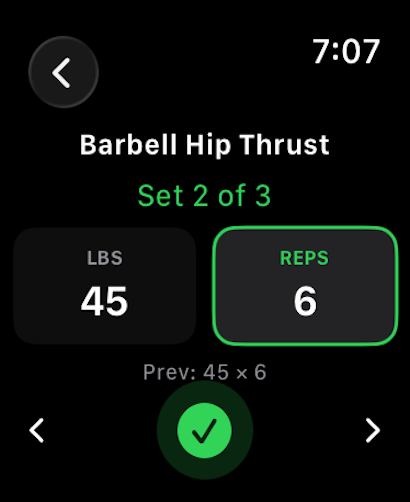
Bazu now runs on Apple Watch. Log sets with the Digital Crown, rest with haptic alerts, and use a smart rest timer calibrated to each exercise.
Newer update: Bazu can now start and complete workouts entirely on Apple Watch, then sync automatically when it reconnects. Read the current Watch release →
Hi everyone,
This one I'm especially happy to ship. Start a workout on iPhone, then Bazu takes the active session to Apple Watch — log sets from your wrist, rest with a haptic alert, and finish without pulling out your phone again. Alongside it, the rest timer is now exercise-aware: heavy compounds rest longer, accessories rest shorter, automatically.
Open Bazu on iPhone to get the update, then start a workout and your Watch will take it from there.
The moment you start a workout on your iPhone, Bazu opens on your Watch. You see your current exercise, the set you're working, and your last session's numbers for context. Spin the Digital Crown to enter weight (2.5 lb steps) and reps, check off the set, feel the rest haptic — repeat. After that initial start, your phone can go back in your bag while you train and finish from the Watch.
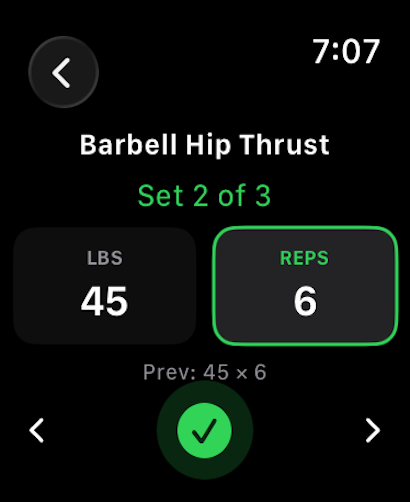
What's on the Watch:
It also picks up your settings automatically. Weight units, rest preferences, and Pro state all sync from the iPhone — set it once, it follows you.
A 90-second rest is right for some exercises and wrong for others. Heavy squats need more. Cable curls need less. The old timer used one number for everything. The new one knows the difference.
Four modes, configurable in Workout Preferences:
The timer auto-starts the moment you check off a set. Quick +/− buttons let you adjust mid-countdown without resetting. Your choice saves and syncs across iPhone and Watch.
The practical upside: you stop leaving reps on the table from under-resting on compounds, and stop wasting time over-resting on accessories.
When you finish a workout that closes out a long-term goal — 315 × 5, finally — Bazu now surfaces a dedicated celebration screen the moment it's detected. Your achieved value, your target, the key stat from that session, and a haptic that's distinct from a normal workout finish.
The payoff arrives when it should: right after you rack the bar, not later when you happen to open the Goals tab. Completed goals also now show a gold trophy and "ACHIEVED" badge across Home and Goals, instead of a dimmed checkmark.
Cut a session short for time, fatigue, or any other real-world reason and Bazu now shows you a confirmation sheet listing exactly which sets are still incomplete. Two clear options: go back and complete them, or finish the workout as-is.
No guessing, no silent data loss, explicit control over the decision.
For more on how Bazu thinks about personal records, see how Bazu calculates PRs. For the training idea behind steady progress, see Progressive Overload 101.
If Bazu has made your training more intentional, a quick App Store review goes a long way. It's the main reason other serious lifters find the app.
Thanks for using Bazu. Keep on lifting.
Pair this product update with the relevant calculator, exercise, and training guidance.
Choose practical rest periods for strength, muscle, and endurance work.
ExploreExerciseBrowse proper form, muscles worked, mistakes, and progression advice.
ExploreCalculatorTurn your best recent set into a practical next-session target.
ExploreProductSee how Bazu handles active sets, rest, and live BPM on your wrist.
Explore