If you’re searching for the best free workout tracker app for strength training — not social feeds, not ads, not distractions — Bazu was built for you.
Bazu is a fast, focused workout logging app designed for lifters who care about real progress. Start workouts in seconds. Log your lifts. Track what’s improving.
No ads. No social feeds. Just training.
Key takeaways
- Unlimited workouts, 500+ exercises, full history, and offline mode are all free — no trial, no credit card.
- Log sets from your Apple Watch with the Digital Crown, see live BPM during rest, and use a smart rest timer that calibrates rest duration to each exercise — all free.
- Warm-up sets and supersets are included, so your log can match the way you actually train without turning warm-ups into fake working-set volume.
- Fast logging, routines, and the smart rest timer reduce friction so progressive overload becomes a habit.
- Offline logging and cloud sync work together so missed data from poor gym connectivity isn't a concern.
- The free tier covers the complete training loop, including permanent PR history and 1RM estimates; Pro adds advanced overload recommendations, Next Workout Targets, and higher planning limits.
What's Included for Free
No trial period. No credit card required. No features unlocked temporarily.
The free tier covers the complete training loop:
- Unlimited workouts — log every session, every day, with no caps
- 500+ exercises — the full built-in library, nothing gated behind a paywall
- Unlimited workout history — every session stored, searchable by date or exercise
- Smart rest timer (exercise-aware) — calibrated rest duration per exercise; four modes (Smart Minimum, Smart Offset, Smart Maximum, Fixed Universal); auto-starts the moment you check a set
- Phone-free Apple Watch workouts — choose a routine on your Watch, log sets with the Digital Crown, see live BPM and rest haptics, then sync automatically when you reconnect to iPhone
- Smart warm-up sets — tag a set with
W to receive a suggested weight you can override while keeping it out of PRs, volume totals, and Progressive Overload calculations
- Editable completed workouts — correct sets, supersets, title, or date while Bazu repairs affected PR history and Insights automatically
- Supersets — pair exercises for accessory work, core blocks, push/pull training, or shorter sessions
- Offline mode — train anywhere, sync automatically when back online
- Personal records — permanent PR history displayed per exercise, in Insights, and inside completed workouts where records were earned
- 1RM estimates — modeled strength benchmarks for every exercise, free
- Volume analytics — weekly totals and trends to track training load
- Up to 4 routines — covers most common splits: Push/Pull/Legs, Upper/Lower, Full Body
- Up to 3 goals — multi-lift focus without tracking overload
- Up to 10 custom exercises — for movements not in the built-in library
That's the full core experience. If you train five days a week on a PPL split with a few strength goals, the free tier handles it completely. Pro adds Progressive Overload recommendations, deeper insights, and higher limits for lifters who need them — but most don't.
Want to test the numbers before you download? Use Bazu's free 1RM calculator, Strength Standards Calculator, and protein calculator.
Start Workouts in Seconds
Most gym apps slow you down — starting before you even open them. Account setup, program selection, tutorial flows, fitness quizzes. Bazu skips all of that.
Sign in with Apple or Google in one tap (or use email and password), and you can be logging your first set in under a minute. No program to pick. No tutorial to watch. No setup required.

Bazu start workout screen.
With this gym workout tracker, you can:
- Start a workout instantly
- Log sets, reps, and weight in two taps or less
- Use a smart rest timer that auto-starts and adjusts duration per exercise
- See your last session's weight × reps right above the input — know what to beat
You spend your time lifting — not tapping through menus.
If you’ve been looking for a minimalist workout log app that doesn’t get in your way, this is it.
Workout Settings Built for the Gym Floor
Every lifter has different rest needs. Strength work needs more recovery time. Conditioning work needs less.
Bazu lets you configure this once and adjust it anytime — including during an active workout:
- Smart rest timer — choose Smart Minimum, Smart Offset, Smart Maximum, or a single Fixed Universal duration; adjust mid-countdown with quick +/− buttons without resetting
- Mid-session adjustments — change your rest duration during a live workout without navigating away from your session
- Autofill sets — when you add a new set, previous reps and weight are pre-filled; confirm or adjust in one tap
- Units — choose pounds or kilograms; applies to new entries going forward
Small controls that add up to a noticeably smoother session.
See Your Progress Clearly
A good strength training tracker should make progress obvious.

Bazu insights screen.
Bazu shows you:
- Personal records and top lifts
- Total volume lifted
- Workout streaks and consistency
- Weekly and monthly summaries
- Clear strength and volume trends over time
- Muscle breakdown by group — tap Legs, Chest, Back, Shoulders, Arms, or Core to see exact volume per muscle, backed by your full unlimited history
Instead of guessing whether you’re improving, you can see it.
The home screen gives you the same context at a glance before each session: a monthly calendar showing which days you trained, your last few workouts, and your active goals. You open the app, see where you left off, and start the right workout — without digging through history.
For anyone searching “how to track progressive overload,” Bazu keeps it simple: log consistently, and your progress is organized automatically. If you want a deeper framework, start with this guide on progressive overload basics, or use the Strength Standards Calculator to benchmark your squat, bench press, deadlift, or total by bodyweight.
Track Strength Goals With Deadlines
Training without direction leads to random workouts.

Bazu goals screen.
Bazu lets you:
- Set strength goals with target dates
- See daily progress toward each goal
- Know when a goal is on track — or at risk
- Hit a goal mid-session and Bazu surfaces a celebration screen on the spot — distinct haptic, your achieved value, your target
Whether you’re building consistency or pushing toward a new PR, this free workout tracker app helps you train with intention. For short-session consistency, pair it with a 5-minute workout log habit.
Routines That Are Always Ready
A strong workout planner app should reduce friction.
With Bazu you can:
- Create and reuse workout routines
- Save any completed workout as a routine in one tap — no rebuilding from scratch
- Start sessions instantly from saved plans
- See exercise count, sets, and estimated time
- Stay organized across training cycles
Your plan is always one tap away.
Full Workout History — Clear and Searchable
Your training history matters.
Bazu keeps everything organized so you can:
- Browse past workouts by date
- Filter by PRs or exercises
- See total time and volume at a glance
If you’re looking for a free strength training log app, history shouldn’t be buried behind complexity. Trend review gets easier when PRs are easy to spot over time, as covered in how to spot PRs and training trends.
Works Without Internet
Not every gym has perfect service.

Bazu works offline and syncs later.
Bazu works offline:
- Log workouts without internet
- Sync automatically when you’re back online
- Automatic cloud backup
- Seamless sync across devices
It’s a free fitness tracker app — and it works wherever you train.
Start and Finish Workouts on Apple Watch
Choose a saved routine directly on Apple Watch and run the entire active session on-device. Your iPhone can stay at home or in your bag.
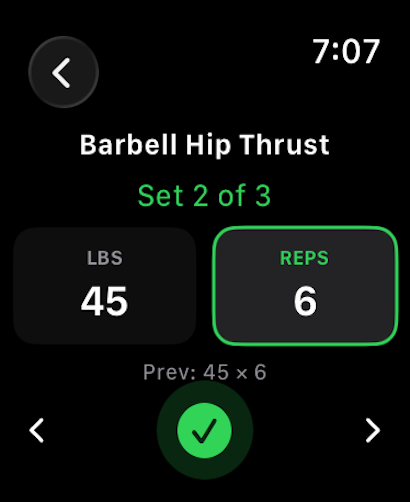
Bazu on Apple Watch — log a set with the Digital Crown.
Dial in weight (2.5 lb steps) and reps with the Digital Crown, check off the set, feel the smart rest timer haptic, and repeat. Previous performance — last session's weight × reps — is shown above the inputs for context, and a live trophy confirms a new PR on your wrist.
The workout remains fully on-device while you train. When Apple Watch reconnects to iPhone, sets and available Health data sync automatically with no manual transfer.
See the phone-free Watch, smart warm-up, and editable-history release details.
Custom Exercises | 500+ Built In

Every lifter trains differently.
Bazu includes:
- 500+ built-in exercises — each with anatomy illustration, how-to guide, and common mistakes
- Per-exercise Stats tab: total sets, total volume, and 1RM progression chart
- Set notes with quick-add presets — Form Check, Easy +5lb, Joint Pain, PR!, and more
- Custom exercise creation
- Support for different equipment and tracking types
From barbell lifts to machine work, your training style is supported.
Simple by Design
Many “best workout tracker” lists include apps packed with social feeds and distractions. See how Bazu compares against the most popular alternatives in the Bazu vs Strong vs Hevy comparison.
Bazu is different. If you want the most stripped-back approach, see what makes a minimalist workout app actually work.
- Clean, distraction-free layout
- Dark and light mode
- No ads
- No social feeds
- No clutter
The logging screen is where you spend the most time in any gym app — between every set, for every rep. Bazu’s logging view is the most visually minimal of the major workout trackers: no exercise icons, no notes placeholders, no stats bar running totals at the top. Just bold exercise names, clean input rows, and your previous session numbers. Your eye goes directly to what you need to log next. Nothing else competes for attention.
Under gym conditions — low light, fatigue, 90 seconds of rest — that simplicity is measurable. Fewer elements means faster decisions. Faster decisions means less friction between sets.
If you’ve searched for a free workout tracker with no ads, this is exactly that.
A Free Workout Tracker App Built for Lifters
Bazu isn’t trying to be everything.
It’s a focused gym log app for strength training.
If you want:
- Unlimited workouts, history, and exercises — free
- Fast logging with smart recommendations
- Clear progress tracking with PRs and volume trends
- No ads
- No social noise
Bazu helps you stay consistent, progressive, and focused on lifting.
Start your next workout in seconds, track your PRs, and stay focused.
FAQ
What is the best workout tracker app for strength training?
For lifters who want a fast, focused logging experience, Bazu is one of the best workout tracker apps available. It's built specifically for strength training — progressive overload, PRs, volume tracking — without social feeds, ads, or distractions cluttering the interface.
What is the best free workout tracker app?
Many apps offer free tiers, but most hit paywalls at routine limits or history caps. Bazu provides unlimited workout logging, 500+ exercises, editable workout history, offline mode, phone-free Apple Watch workouts, smart warm-up weights, and a smart, exercise-aware rest timer — all permanently free, with no ads.
Is Bazu really free to use?
Yes. Unlimited workouts, the full 500+ exercise library, editable workout history, offline mode, smart rest, smart warm-up weights, supersets, permanent PR history, PRs on every exercise, 1RM estimates, volume analytics, and phone-free Apple Watch workouts are all free — permanently, with no trial period. Pro adds Progressive Overload recommendations, Next Workout Targets, deeper analytics, and higher limits (unlimited routines, goals, and custom exercises). No ads, either way.
Does Bazu work offline at the gym?
Yes. You can log workouts without internet and sync when you are back online.
Is this app good for progressive overload?
Yes, for many lifters. The app keeps your workout history visible so reps, load, and PR trends are easier to track week to week.
What are the limits in the free tier?
The free tier supports up to 4 routines, 3 active goals, and 10 custom exercises. Personal records are unlimited and permanent — every PR across every exercise is visible, sortable, filterable, searchable, and tied back to the workout that earned it at no cost. Volume analytics show weekly totals and trends. These limits are designed for lifters on a standard program; the things that matter most — workouts, exercises, history, and PRs — have no caps.
How long does it take to get set up?
Under a minute. Sign in with Apple or Google, or create an account with email and password. There's no program selection, no onboarding flow, and no tutorial. After signing in, you can start your first workout immediately.
What if I run into a problem or want to request a feature?
Both are available directly in the app — no need to search for a contact email or support page. You can submit a support request or suggest a feature from the Profile section. Feature requests go directly to the team.
Download Bazu on the App Store or get it on Google Play